Server 2008 is one of Microsoft Windows' server series of operating systems. It is the successor to Windows Server 2003. Like Windows Vista and Windows 7, Windows Server 2008 is built on Windows NT 6.x. In this blog we’ll discuss some of its extraordinary features.
NTFS - Windows’s server 2008 used an improved version of NTFS, a new system service works in the background that can identify a file system error, and perform an automatic healing process without anyone taking the server down.
Address Space Load Randomization (ASLR) -Probably one of the most divisive included features already, especially since it’s introduced with Vista, ASLR makes sure that no two subsequent instances of an operating system load the same system drivers in the same location in memory each time.
Powershell- It's a part of the shipping operating system: the completely new command line tool that can either supplement or completely replace GUI-based administration.
Server-Core - Windows Server 2008 introduces a variation of installation called Server Core. Server Core is a radically scaled-back installation where no Windows Explorer shell is installed. All configuration and maintenance is performed completely through command line interface windows, or by connecting to the machine remotely using Microsoft Management Console. However, Notepad and some control panel applets, such as Regional Settings, are available.
Windows System Resource Manager- It offers resource management and can be very handy to control the amount of resources a process or a user can use based on business priorities. Process Matching Criteria, which is defined by the name, type or owner of the process, imposes restrictions on the resource usage by a process that matches the criteria. CPU time, bandwidth that it can use, number of processors it can be run on, and allocated to a process can be restricted. Restrictions can be set to be imposed only on certain dates as well.
Showing posts with label windows server 2008. Show all posts
Showing posts with label windows server 2008. Show all posts
Saturday, January 23, 2010

Thursday, May 14, 2009
SharePoint 2010 will require 64-bit SQL Server
SharePoint 2010 will require a 64-bit version of SQL Server and it will not support Internet Explorer 6, according to Microsoft.
At the company’s annual TechEd conference, Microsoft also revealed that SharePoint 2010 will not be available with the Office 2010 beta that it plans to ship in July.
“That release will mostly focus on the client side,” said Tom Rizzo, director of Microsoft SharePoint Server, during his conference session.
Microsoft will release that beta to a select group of testers, but has said previously there will be a public beta.
Rizzo said during the session that it was a “painful decision” to drop support for IE 6, but that Microsoft would support an array of browsers including IE 7 and beyond, Firefox 3.x on Windows and non-Windows platforms, and Safari 3.x on non-Windows platforms.
As far as the 64-bit support, Rizzo said as gently as he could, “You have been warned.”
SharePoint 2010 will run on the 64-bit version of Windows Server 2008 and on SQL Server 2005 and 2008.
Rizzo also said SharePoint 2010 would feature Fast Search for SharePoint and Fast Search for Internet Business. Microsoft last year purchased Norway-based Fast Search & Transfer, which developed enterprise search software.
Source: news.idg.no/cw/art.cfm?id=3551DC97-1A64-6A71-CEA3C67372A96FB6
At the company’s annual TechEd conference, Microsoft also revealed that SharePoint 2010 will not be available with the Office 2010 beta that it plans to ship in July.
“That release will mostly focus on the client side,” said Tom Rizzo, director of Microsoft SharePoint Server, during his conference session.
Microsoft will release that beta to a select group of testers, but has said previously there will be a public beta.
Rizzo said during the session that it was a “painful decision” to drop support for IE 6, but that Microsoft would support an array of browsers including IE 7 and beyond, Firefox 3.x on Windows and non-Windows platforms, and Safari 3.x on non-Windows platforms.
As far as the 64-bit support, Rizzo said as gently as he could, “You have been warned.”
SharePoint 2010 will run on the 64-bit version of Windows Server 2008 and on SQL Server 2005 and 2008.
Rizzo also said SharePoint 2010 would feature Fast Search for SharePoint and Fast Search for Internet Business. Microsoft last year purchased Norway-based Fast Search & Transfer, which developed enterprise search software.
Source: news.idg.no/cw/art.cfm?id=3551DC97-1A64-6A71-CEA3C67372A96FB6
Wednesday, April 15, 2009
Enabling PowerShell on Windows Server 2008
For Windows editions prior to Windows Server 2008, PowerShell was an installable application. PowerShell now exists as a Windows feature for Windows Server 2008 in all editions except Core. The forthcoming Windows Server 2008 R2 release is, however, scheduled to offer PowerShell support.
To enable the PowerShell feature follow these steps:
Server manager
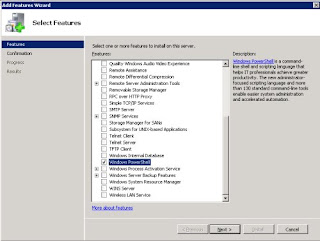
You can drop PowerShell on the server through the Server manager application. Go to the Features section and select Windows PowerShell. Figure A shows this selection in the Features wizard.
Scripted installation
The other approach that suits many administrators for a semi-automated configuration is to script the installation of Windows components. The ocsetup command can enable PowerShell on Windows Server 2008 with a one-liner. The command below will add the PowerShell feature to the server:
start ocsetup MicrosoftWindowsPowerShell
Once the server manager window is refreshed, the PowerShell feature will display as being installed, and the PowerShell shortcut will appear in the Start menu in the Windows PowerShell 1.0 program group. PowerShell is now ready for use.
Source: /blogs.techrepublic.com.com
To enable the PowerShell feature follow these steps:
Server manager
You can drop PowerShell on the server through the Server manager application. Go to the Features section and select Windows PowerShell. Figure A shows this selection in the Features wizard.

Scripted installation
The other approach that suits many administrators for a semi-automated configuration is to script the installation of Windows components. The ocsetup command can enable PowerShell on Windows Server 2008 with a one-liner. The command below will add the PowerShell feature to the server:
start ocsetup MicrosoftWindowsPowerShell
Once the server manager window is refreshed, the PowerShell feature will display as being installed, and the PowerShell shortcut will appear in the Start menu in the Windows PowerShell 1.0 program group. PowerShell is now ready for use.
Source: /blogs.techrepublic.com.com
Thursday, April 2, 2009
Windows Server OS for Small Businesses by Microsoft
Microsoft introduced a version of its Windows Server OS for small businesses with 15 users or less, filling in what the company sees as a gap in its server offerings.
Windows Server 2008 Foundation initially will be available in 40 countries once its OEM (original equipment manufacturer) partners release servers for the new OS, since it will be sold exclusively through them. Hewlett-Packard, Dell and IBM should have those servers out sometime in the second half of this year, according to Microsoft.
Microsoft recommends using the new OS edition for basic small business IT needs such as running and maintaining a database, Web-site hosting, running line-of-business applications, file- and print-sharing and remote access, among other uses.
Microsoft already has an OS and software bundle called Windows Small Business Server (SBS) aimed at the small-business market. But that package bundles the Windows Server OS with Exchange Server, SQL Server and other business software, and may be more than some very small companies need to run their businesses.
One thing that will make Windows Server 2008 Foundation more affordable for small businesses is that the OS does not require them to purchase client access licenses, which other Microsoft business software -- including SBS -- does. Instead, the OS is licensed by user accounts; however, each license is limited to a maximum of 15 user accounts, and each one of those accounts can only have one distinct user at a time.
Microsoft CEO Steve Ballmer let the news slip that Microsoft would add a low-end release of Windows Server to its existing server OS portfolio on a conference call with members of the financial community in February. At the time he likened it to a netbook version of the Windows client OS.
Source: .pcworld.com
Windows Server 2008 Foundation initially will be available in 40 countries once its OEM (original equipment manufacturer) partners release servers for the new OS, since it will be sold exclusively through them. Hewlett-Packard, Dell and IBM should have those servers out sometime in the second half of this year, according to Microsoft.
Microsoft recommends using the new OS edition for basic small business IT needs such as running and maintaining a database, Web-site hosting, running line-of-business applications, file- and print-sharing and remote access, among other uses.
Microsoft already has an OS and software bundle called Windows Small Business Server (SBS) aimed at the small-business market. But that package bundles the Windows Server OS with Exchange Server, SQL Server and other business software, and may be more than some very small companies need to run their businesses.
One thing that will make Windows Server 2008 Foundation more affordable for small businesses is that the OS does not require them to purchase client access licenses, which other Microsoft business software -- including SBS -- does. Instead, the OS is licensed by user accounts; however, each license is limited to a maximum of 15 user accounts, and each one of those accounts can only have one distinct user at a time.
Microsoft CEO Steve Ballmer let the news slip that Microsoft would add a low-end release of Windows Server to its existing server OS portfolio on a conference call with members of the financial community in February. At the time he likened it to a netbook version of the Windows client OS.
Source: .pcworld.com
Monday, March 16, 2009
Server Migration Solution for Windows Server
Microsoft is already providing customers running its Windows Server operating system with the necessary resources to streamline the process of migrating not only server roles, but also operating system settings, and even data to Windows 7 Server (Windows Server 2008 R2). The Server Migration solution for Windows Server 2008 R2 is, according to the Redmond company, the one-stop-shop for all the resources necessary to migrate from Windows Server 2003, Windows Server 2008, or Windows Server 2008 R2 to Windows Server 2008 R2.
“Server role migration guides - we currently have migration guides for the top 5 server roles (AD DS, DNS Server, DHCP Server, File Services, and Print Services), and for BranchCache, a new feature in Windows Server 2008 R2. Our guides provide you with step-by-step instructions to migrate server roles or features end to end,” revealed a member of the Windows Server Division. “Windows Server Migration Tools - we also provide you a set of Windows PowerShell cmdlets to help you automate migration steps. Migration cmdlets currently support two server roles and one feature (DHCP, FSRM and BranchCache), operating system settings (IP configuration, local users and groups), and data (with NTFS and share permissions).”
Windows Server 2008 R2 is indeed still far from finalization, but the software giant has already made the jump to the successor of Windows Server 2008. According to the Redmond company a single box out of the servers powering Microsoft.com is still running Windows Server 2008, with the rest having been upgraded to Windows Server 2008 R2 Beta.
“The Windows Server Migration Tools, and most migration guides, support cross-architecture migrations (x86-based to x64-based computing platforms), migrations between physical and virtual environments, and migrations between both the full and Server Core installation options of the Windows Server operating system, where available,” the Windows Server Division representative added.
Download from here:
“Server role migration guides - we currently have migration guides for the top 5 server roles (AD DS, DNS Server, DHCP Server, File Services, and Print Services), and for BranchCache, a new feature in Windows Server 2008 R2. Our guides provide you with step-by-step instructions to migrate server roles or features end to end,” revealed a member of the Windows Server Division. “Windows Server Migration Tools - we also provide you a set of Windows PowerShell cmdlets to help you automate migration steps. Migration cmdlets currently support two server roles and one feature (DHCP, FSRM and BranchCache), operating system settings (IP configuration, local users and groups), and data (with NTFS and share permissions).”
Windows Server 2008 R2 is indeed still far from finalization, but the software giant has already made the jump to the successor of Windows Server 2008. According to the Redmond company a single box out of the servers powering Microsoft.com is still running Windows Server 2008, with the rest having been upgraded to Windows Server 2008 R2 Beta.
“The Windows Server Migration Tools, and most migration guides, support cross-architecture migrations (x86-based to x64-based computing platforms), migrations between physical and virtual environments, and migrations between both the full and Server Core installation options of the Windows Server operating system, where available,” the Windows Server Division representative added.
Download from here:
Thursday, March 5, 2009
SP2 RC for Vista and Server 2008 Goes Public
Microsoft today released the Release Candidate build of Service Pack 2 (6002.16670.090130) for Windows Vista and Windows Server 2008 to the public. You can grab the standalone installer package from the Microsoft Download Center for 32-bit five languages and 32-bit all languages, 64-bit five languages and 64-bit all languages, as well as Itanium five languages and Itanium all languages. If you have Vista in English, French, German, Japanese, or Spanish, download the five languages package, otherwise get the larger "all language" version. There is also a five language and an all language .iso image available, as well as a patch that will allow you to get it via Windows Update. While this is a public release, it is still a Release Candidate, and Microsoft is recommending that the average customer "wait until the final release prior to installing this service pack" and reminding testers that "a Service Pack is not a feature release—we are not looking for new feature suggestions, only SP2 regressions, crashes, and confirmation of fixes we've made will be considered for this milestone."
The public release follows the release of the build to Microsoft Connect testers two weeks ago. The full list of the 691 hotfixes included in the service pack was made available then, and Microsoft detailed the various improvements the service pack contains. That information later appeared on the official Windows Blog, so if you're interested in the exact breakdown of application compatibility improvements, hardware ecosystem support and enhancements, operating system experience updates, enterprise improvements, as well as setup and deployment improvements, head over there for the official details.
As with previous service packs, SP2 will include all previous updates and patches for the operating system (for example, SP2 marks the inclusion of Hyper-V into Windows Server 2008 natively) as well as significant performance improvements (on top of those in SP1).
It's also worth noting that there are known issues with this build:
* Application compatibility:
o The operating system security settings will incorrectly show some versions of certain antivirus applications as inactive when they are not. Two applications known to be affected are all versions of Avira AntiVir prior to and including 8.2.0.611 and all versions of Trend Micro Internet Security prior to version 17. There is no workaround at this time for those application versions. More recent versions of these applications are not affected.
o Security Innovation Holodeck 2.8.0 (enterprise edition) may unexpectedly quit. There is no workaround at this time.
* Internet Information Services: If a Web application or service attempts to access Active Directory Service Interfaces (ADSI) remotely using an Internet Information Services 7.0 process that runs under the application pool identity, the access will fail. To avoid this, run the process under a different identity, such as Network Service.
* SQL Server 2008: This issue affects Windows Server 2008 Standard, Windows Server 2008 Enterprise, and Windows Server 2008 Datacenter. If you attempt to install SQL Server 2008 on a failover cluster, the installation will fail. If you are affected by this, have a look at the details and workaround.
SP2's main requirement that SP1 is already installed. Some have said that this is because SP2 is not yet finalized, but it has been confirmed that the final version of SP2 will still have SP1 as a prerequisite. The reason for this is size. Microsoft wants the size of SP2 to be smaller Server 2008 shipped with SP1 already installed, including the contents of the SP1 client code, which would make the Server deployments even bigger. SP2 applies to both the client and server versions of Windows because Microsoft adopted a single serviceability model to minimize deployment. Also, by releasing one single service pack, Microsoft has less testing to do, since Vista and Server 2008 have the same binaries for all common files, making for a quicker release.
Source: http://arstechnica.com/microsoft/news/2009/03/sp2-rc-for-vista-and-server-2008-goes-public.ars
The public release follows the release of the build to Microsoft Connect testers two weeks ago. The full list of the 691 hotfixes included in the service pack was made available then, and Microsoft detailed the various improvements the service pack contains. That information later appeared on the official Windows Blog, so if you're interested in the exact breakdown of application compatibility improvements, hardware ecosystem support and enhancements, operating system experience updates, enterprise improvements, as well as setup and deployment improvements, head over there for the official details.
As with previous service packs, SP2 will include all previous updates and patches for the operating system (for example, SP2 marks the inclusion of Hyper-V into Windows Server 2008 natively) as well as significant performance improvements (on top of those in SP1).
It's also worth noting that there are known issues with this build:
* Application compatibility:
o The operating system security settings will incorrectly show some versions of certain antivirus applications as inactive when they are not. Two applications known to be affected are all versions of Avira AntiVir prior to and including 8.2.0.611 and all versions of Trend Micro Internet Security prior to version 17. There is no workaround at this time for those application versions. More recent versions of these applications are not affected.
o Security Innovation Holodeck 2.8.0 (enterprise edition) may unexpectedly quit. There is no workaround at this time.
* Internet Information Services: If a Web application or service attempts to access Active Directory Service Interfaces (ADSI) remotely using an Internet Information Services 7.0 process that runs under the application pool identity, the access will fail. To avoid this, run the process under a different identity, such as Network Service.
* SQL Server 2008: This issue affects Windows Server 2008 Standard, Windows Server 2008 Enterprise, and Windows Server 2008 Datacenter. If you attempt to install SQL Server 2008 on a failover cluster, the installation will fail. If you are affected by this, have a look at the details and workaround.
SP2's main requirement that SP1 is already installed. Some have said that this is because SP2 is not yet finalized, but it has been confirmed that the final version of SP2 will still have SP1 as a prerequisite. The reason for this is size. Microsoft wants the size of SP2 to be smaller Server 2008 shipped with SP1 already installed, including the contents of the SP1 client code, which would make the Server deployments even bigger. SP2 applies to both the client and server versions of Windows because Microsoft adopted a single serviceability model to minimize deployment. Also, by releasing one single service pack, Microsoft has less testing to do, since Vista and Server 2008 have the same binaries for all common files, making for a quicker release.
Source: http://arstechnica.com/microsoft/news/2009/03/sp2-rc-for-vista-and-server-2008-goes-public.ars
Wednesday, January 21, 2009
Antivirus Beta for Windows 7
Kaspersky releases Antivirus beta for Windows 7. The prototype is based on a new antivirus engine which provides complete antivirus protection from all types of Internet threats.
The new version of Kaspersky Anti-Virus is designed to secure computers running under Windows 7. The beta test version of Microsoft Windows 7 operating system was released at the beginning of January 2009.
"We knew the release of the new version of Windows would be a huge event for the IT community, which is why we were prepared for it," said Alexey Kalgin, Director Product Marketing, Corporate Business Division, Kaspersky Lab. "Our company has always made support for Microsoft's new operating systems a top priority. For example Kaspersky Anti-Virus for Windows Vista was released simultaneously with the operating system's official launch. When Windows Server 2008 was released, Kaspersky Anti-Virus was the only antivirus product on the market certified by Microsoft. Users can now see for themselves how our antivirus protection technologies perform on the new platform."
This new version includes real-time scanner, firewall and anti-spam protection. The product is optimised for multi-core systems and will be available for both 32bit and 64bit versions of Windows 7.
Download: Kaspersky Antivirus Beta for Windows 7
The new version of Kaspersky Anti-Virus is designed to secure computers running under Windows 7. The beta test version of Microsoft Windows 7 operating system was released at the beginning of January 2009.
"We knew the release of the new version of Windows would be a huge event for the IT community, which is why we were prepared for it," said Alexey Kalgin, Director Product Marketing, Corporate Business Division, Kaspersky Lab. "Our company has always made support for Microsoft's new operating systems a top priority. For example Kaspersky Anti-Virus for Windows Vista was released simultaneously with the operating system's official launch. When Windows Server 2008 was released, Kaspersky Anti-Virus was the only antivirus product on the market certified by Microsoft. Users can now see for themselves how our antivirus protection technologies perform on the new platform."
This new version includes real-time scanner, firewall and anti-spam protection. The product is optimised for multi-core systems and will be available for both 32bit and 64bit versions of Windows 7.
Download: Kaspersky Antivirus Beta for Windows 7
Thursday, December 4, 2008
some important features in Windows Server 2008 R2
Microsoft plans to release an R2 edition of Windows Server 2008 in 2009 or 2010. Here are the key features of the R2 release that you need to know.
The most prominent is that Windows Server 2008 will solely be an x64 platform with the R2 release. This will make the upgrade to x64 platforms not really a surprise, as all current server class hardware is capable of 64-bit computing.
There is one last window of time to get a 2008 release of Windows still on a 32-bit platform before R2 is released, so do it now for those difficult applications that don’t seem to play well on x64 platforms.
Beyond the processor changes, here are the other important features Windows Server 2008 R2:
Hyper-V improvements: The Hyper-V is planned to offer Live Migration as an improvement to the initial release of Quick Migration; Hyper-V will measure the migration time in milliseconds. This will be a solid point in the case for Hyper-V compared to VMware's ESX or other hypervisor platforms. Hyper-V will also include support for additional processors and Second Level Translation (SLAT).
PowerShell 2.0: PowerShell 2.0 has been out in a beta release and Customer Technology Preview capacity, but it will be fully baked into Windows Server 2008 R2 upon its release. PowerShell 2.0 includes over 240 new commands, as well as a graphical user interface. Further, PowerShell will be able to be installed on Windows Server Core.
Core parking: This feature of Windows Server 2008 will constantly assess the amount of processing across systems with multiple cores, and under certain configurations, suspend new work being sent to the cores. Then with the core idle, it can be sent to a sleep mode and reduce the overall power consumption of the system.
All of these new features will be welcome and add great functionality to the Windows Server admin. The removal of x86 support is not entirely a surprise, but the process needs to be set in motion now for how to address any legacy applications.
Source:zdnetasia.com/techguide/windows/0,39044904,62048917,00.htm
Monday, November 24, 2008
Windows Server 2008 Evaluation Enterprise Edition and Server Core Virtual Hard Drive Images
The Microsoft VHD format is the common virtualization file format for Virtual PC, Virtual Server 2005 and Hyper-V that provides a uniform product support system, and provides more seamless manageability, security, reliability and cost-efficiency for customers.
This VHD release is available in English only and is for evaluation and testing purposes. Evaluating Windows Server2008 software does not require product activation or entering a product key. Any edition of Windows Server 2008 may be installed without activation and evaluated for an initial 60 days.
If you need more time to evaluate Windows Server 2008, the 60 day evaluation period may be reset (or re-armed) three times, extending the original 60 day evaluation period by up to 180 days for a total possible evaluation time of 240 days. After this time, you will need to uninstall the software or upgrade to a fully-licensed version of Windows Server 2008.
As this installation requires Hyper-V, you will need to have a base install of Windows Server 2008 (64bit edition), running Hyper-V.
Both virtual machines available here are running Windows Server 2008 Enterprise Edition Evaluation. One is the default full installation, and the other has been configured as a default Core installation. For more information on the difference between full and core installation please see the Windows Server 2008 Editions Overview pages. For download options please see the IMAGE SELECTION section in the instructions below.
As both virtual machines do not have anti-virus installed, they should not be connected to any network until it has anti-virus installed. In addition, the operating system and programs installed were patched with all updates as of May 8, 2008.
The following download is for Hyper-V deployments. If you are looking to evaluate Windows Server 2008 on Virtual Server 2005 then please visit: Windows Server 2008 Evaluation VHD Images (for VS2005).
Via:dabcc.com/downloadfile.aspx?id=650
This VHD release is available in English only and is for evaluation and testing purposes. Evaluating Windows Server2008 software does not require product activation or entering a product key. Any edition of Windows Server 2008 may be installed without activation and evaluated for an initial 60 days.
If you need more time to evaluate Windows Server 2008, the 60 day evaluation period may be reset (or re-armed) three times, extending the original 60 day evaluation period by up to 180 days for a total possible evaluation time of 240 days. After this time, you will need to uninstall the software or upgrade to a fully-licensed version of Windows Server 2008.
As this installation requires Hyper-V, you will need to have a base install of Windows Server 2008 (64bit edition), running Hyper-V.
Both virtual machines available here are running Windows Server 2008 Enterprise Edition Evaluation. One is the default full installation, and the other has been configured as a default Core installation. For more information on the difference between full and core installation please see the Windows Server 2008 Editions Overview pages. For download options please see the IMAGE SELECTION section in the instructions below.
As both virtual machines do not have anti-virus installed, they should not be connected to any network until it has anti-virus installed. In addition, the operating system and programs installed were patched with all updates as of May 8, 2008.
The following download is for Hyper-V deployments. If you are looking to evaluate Windows Server 2008 on Virtual Server 2005 then please visit: Windows Server 2008 Evaluation VHD Images (for VS2005).
Via:dabcc.com/downloadfile.aspx?id=650
Subscribe to:
Posts (Atom)


